Home Office Design: Planning a Workspace You Will Want to Use
· 3 min read · CEPA Interior Design & Solutions
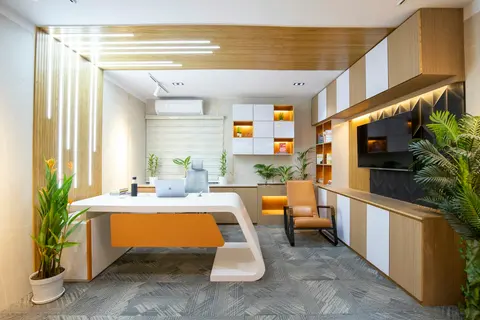
A home office has to do two jobs at once. It needs to support focused work for hours at a time, and it needs to sit comfortably within a home. When it is planned well, it becomes the room you are happy to walk into every morning. When it is not, work spreads to the kitchen table.
This guide covers the decisions that make the biggest difference.
Choose the right space
Not every office needs its own room. Start by thinking about how you work:
- Frequent video calls or confidential work usually need a room with a door.
- Occasional work can fit into a corner of a living room, a landing, or a guest room.
- Creative work, such as music, podcasting, or photography, may need acoustic treatment or extra space for equipment.
Look for natural light, a reasonable distance from household noise, and enough room to stand up and move away from the desk.
Place the desk with care
Desk placement shapes how the room feels and how you look on camera.
- Side to the window gives daylight across the desk without glare on the screen or a dark silhouette on calls.
- Facing into the room feels more open than facing a wall, and gives a better background for video.
- Leave space behind the chair so you can push back comfortably, commonly around 3 ft.
If the room is shared, consider where each person sits so that one person’s calls do not disturb the other.
Get the ergonomics right
Comfort over a long day comes from a few basics:
- a chair that adjusts to your height and supports your back;
- a desk at a comfortable height, or a sit-stand desk;
- the top of the screen at or slightly below eye level, about an arm’s length away;
- a keyboard and mouse at elbow height.
Furniture choices are part of the design, so the office looks considered rather than assembled.
Light for work and for the camera
Good lighting reduces eye strain and makes video calls look professional. We usually plan:
- ambient light for the whole room, ideally dimmable;
- task light at the desk, positioned to avoid glare on the screen;
- soft front light for video calls, so your face is evenly lit instead of lit from above or behind.
Color temperature matters too. A neutral white during the working day keeps the room alert; warmer light in the evening makes it feel like part of the home again.
Control sound
Hard surfaces make a room echo, which is tiring on calls and noticeable to the people you speak with. Rugs, curtains, upholstered seating, bookshelves, and acoustic panels all help. For recording or music studios, sound isolation between rooms needs its own plan, coordinated with your contractor.
Plan storage and cables
Paperwork and equipment quickly take over a desk. Built-in cabinets, closed storage below the desk, and shelving above it keep surfaces clear. Plan outlets and cable routes in the design, so chargers, monitors, and printers do not end up with cables across the floor.
Make it feel like home
The best home offices borrow from the rest of the house: the same materials, a related color palette, a piece of art, a plant. When the workspace fits the home, it is easier to start the day there and easier to close the door at the end of it.
Next steps
Explore our home office and studio design service, read about acoustic room design, or describe your space in the project planner.